
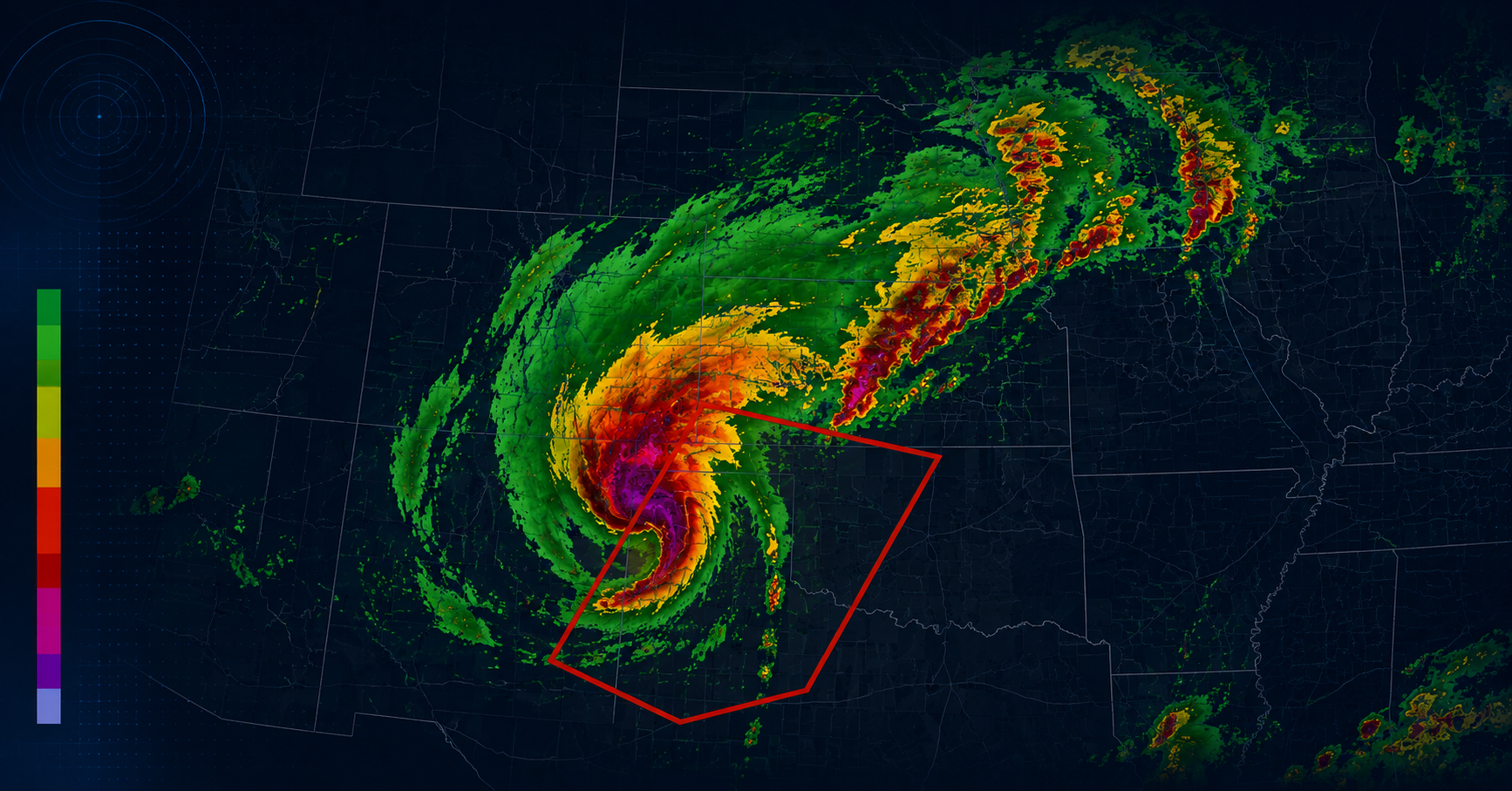
When a tornado warning is issued, your audience goes to your website. A live tornado tracking map on your news site keeps them there — and keeps your station as their trusted source during the moments that matter most.
ZoomRadar is an embeddable tornado tracking map and live Doppler radar widget built for news stations and local publishers. You add it to any website in minutes — no enterprise weather data contract, no developer, and no code required.
Why your news website needs a tornado tracking map
Your broadcast radar keeps viewers watching during severe weather. Your website should do the same.
When a tornado warning or severe thunderstorm watch is issued, traffic to local news websites spikes sharply. Visitors aren’t looking for a story — they’re looking for a tornado tracking map. They want to see where the storm is right now, whether it’s moving toward them, and how fast.
If your website can’t show them that, they leave. They go to Weather.com, the National Weather Service, or a competitor who does have a live tornado tracking map. A live tornado tracking map embedded on your news website keeps your audience on your site.
What a tornado tracking map needs to show
Not all weather embeds are equal. For a tornado tracking map to be genuinely useful during a severe weather event, it needs to display:
- Real-time Doppler radar — actual radar reflectivity data, updated every few minutes. Not a forecast animation.
- Tornado warning overlays — active tornado warnings, severe thunderstorm warnings, and watch boxes displayed directly on the radar.
- Velocity data — rotation signatures in storm cells indicate tornado potential. Level 2 Doppler data includes radial velocity, which meteorologists use to identify mesocyclones.
- Auto-updating display — during an active tornado event, visitors shouldn’t need to reload the page to see new data.
ZoomRadar provides all of these in a single iframe embed.
How to embed a tornado tracking map on your news website
Step 1: Configure your tornado tracking radar
Go to the ZoomRadar pricing page, choose your plan, and access the self sign-up portal to set up your embed:
- Set the geographic center of your coverage area
- Choose your zoom level — local market, metro, or regional
- Enable tornado warning and severe weather overlays
Step 2: Copy your tornado tracking map embed code
Once configured in the self sign-up portal, you receive your personal embed code. Here’s an example of the format:
<iframe src=”https://www.zoomradar.com/embed/?lat=35.4&lon=-97.5&zoom=6″ width=”100%” height=”600″ frameborder=”0″ title=”Live Tornado Tracking Map” allowfullscreen></iframe>
Note: The embed code above is an example showing the format. Your actual embed URL is generated in the ZoomRadar self sign-up portal after subscribing.
Step 3: Add the tornado tracking map to your CMS
Paste the iframe into your WordPress, Webflow, or custom CMS page. On WordPress, use a Custom HTML block. The live tornado tracking radar appears immediately — no plugin, no configuration. Full platform-by-platform guide: How to add a weather widget to your website.
Where to place the tornado tracking map on your news website
- Dedicated weather page — a permanent /weather/ or /storm-center/ page you promote heavily during weather events.
- Homepage section — a persistent tornado tracking map widget in a homepage section gives visitors a reason to return daily.
- Inside storm coverage articles — embed the live tornado tracking radar directly inside severe weather articles.
- Live blog or breaking news page — during an active tornado event, embed the radar alongside real-time updates.
ZoomRadar tornado tracking map vs enterprise weather data
Large broadcast groups often have weather data contracts with providers like The Weather Company or DTN. These contracts typically cover broadcast graphics — not web publishing. Adding a live tornado radar through an enterprise provider typically means:
- Separate contract negotiation for web licensing
- Significant additional cost for web publishing rights (varies by provider and contract)
- Technical integration work from your IT or development team
- Ongoing maintenance as data APIs change
ZoomRadar provides the same Level 2 Doppler radar data and tornado tracking overlay in a self-serve, flat-fee subscription — no IT involvement and no enterprise contract. Weather radar widget vs weather API — full comparison.
What Level 2 Doppler radar means for your tornado tracking map
ZoomRadar’s live tornado radar uses Level 2 Doppler data from the WSR-88D network — the National Weather Service’s nationwide radar system. For tornado tracking specifically:
- Reflectivity data shows precipitation intensity and storm cell locations in real time
- Radial velocity data shows wind rotation — the signature meteorologists look for when identifying tornado-producing supercells
- Spectrum width highlights areas of wind shear and turbulence associated with severe storm development
Frequently Asked Questions
What is the best tornado tracking map for news websites?
ZoomRadar is the leading embeddable tornado tracking map for news stations and local news websites. It displays Level 2 Doppler radar with active tornado warning overlays via a simple iframe embed — no developer or enterprise contract required.
How do news websites show live weather radar and tornado tracking?
Most professional news websites use an embedded radar widget. ZoomRadar provides a live tornado tracking map specifically designed for news stations — paste one iframe code into your CMS and the live radar appears.
Can a small or independent news station afford a live tornado tracking map?
Yes. ZoomRadar offers self-serve subscription plans designed for independent news stations — at a fraction of the cost of enterprise weather data licensing. No sales call, no minimum commitment, no IT required.
How do I add a tornado tracking map to WordPress?
In your WordPress editor, add a Custom HTML block to the page. Paste the ZoomRadar iframe code from your self sign-up portal into the block. The live tornado tracking map appears immediately.
Does ZoomRadar show active tornado warnings on the radar?
Yes. ZoomRadar’s radar embed includes severe weather overlays — active tornado warnings, severe thunderstorm warnings, and watch boxes — displayed directly on the live radar.
What radar network does ZoomRadar use for tornado tracking?
ZoomRadar displays Level 2 Doppler radar from the WSR-88D network — the National Weather Service’s nationwide radar system, the same network used by professional broadcast meteorologists.