
Where you put a weather widget on your homepage affects two things at once: how many visitors actually notice it, and how fast your homepage loads. Get the placement wrong and you either bury a feature you’re paying for, or you slow down the page trying to show it off. Here’s how to think about weather widget homepage placement using ZoomRadar as the example, plus the performance tradeoffs each option carries.
Where to Place a Weather Widget on Your Homepage
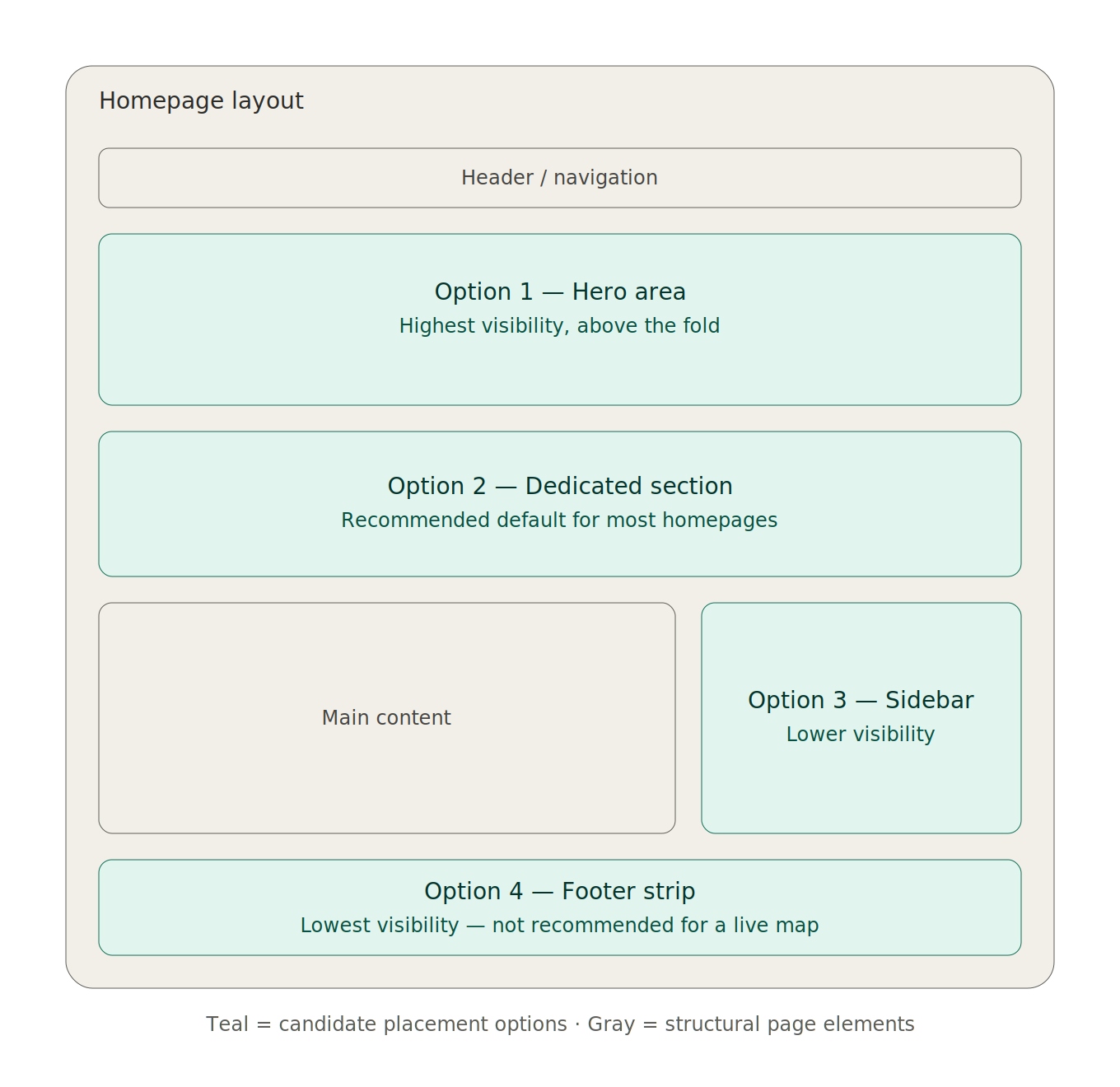
Reference wireframe — not a final design asset
Hero area, above the fold. This is the highest-visibility spot — visitors see the live radar the moment the page loads, with no scrolling required. It works well for sites where weather is core to the value proposition, like local news or emergency services. The tradeoff: a large map here competes with your primary headline and call-to-action for attention, so keep it sized modestly if it’s sharing space with other hero content.
A dedicated section just below the hero. This gives the widget its own visual space without crowding your primary message. Visitors who scroll even slightly will see it, and it reads as a deliberate feature rather than a squeezed-in add-on. This is a reasonable middle ground for most homepages.
Sidebar placement. Common on news and blog-style homepages that already use a sidebar for secondary content. This keeps the map persistently visible as visitors scroll through the main content column, but sidebars tend to get less attention than the main content area, so this suits sites where weather is a helpful extra rather than the main draw.
Footer strip. The lowest-visibility option, and generally a poor fit for a live radar map — if the goal is engagement or ad impressions from the widget, a map few visitors scroll far enough to see doesn’t accomplish much. This spot makes more sense for a simple current-conditions strip than a full interactive radar map.
Design Considerations
Match the map’s size to its placement. A hero-area map should stay compact enough not to push your primary content below the fold entirely. ZoomRadar’s default embed code sets a fixed height rather than resizing automatically, so pair it with the responsive wrapper technique (covered in our embedding guide) if you want the map to adapt to different screen sizes rather than staying fixed. A dedicated section can afford a larger map since it’s not competing for space.
On mobile, homepage real estate is even tighter. Consider whether the widget needs to appear at all on small screens, or whether a smaller version or a link through to a dedicated weather page serves mobile visitors better without adding a large map to an already-long mobile scroll.
If branding matters — for a news site with a sponsor, for instance — ZoomRadar’s logo overlay options (available on the $60/month plan) let the map carry your own or a sponsor’s branding rather than looking like an unbranded third-party embed.
Performance Tips
Keep it to one live map per homepage. Multiple radar embeds on a single page multiply load time for minimal added value — a homepage only needs one, with a link to a dedicated weather page for additional views or coverage areas.
Use lazy loading if the map sits below the fold. ZoomRadar’s default embed code already includes loading=”lazy”, so a map sitting further down the page won’t compete with above-the-fold content for load priority.
Use the responsive wrapper technique for any below-the-fold placement. Wrapping the iframe in a sized container (rather than letting it load with no space reserved for it) prevents the rest of your page from visibly jumping around as the map loads in — a problem called layout shift, which hurts both user experience and page performance scoring.
Frequently Asked Questions
Where should I put a weather widget on my homepage?
For most homepages, a dedicated section just below the hero area balances visibility and performance well for a ZoomRadar map. Reserve the hero area itself for sites where weather is the core value proposition, like local news or emergency services.
Does a weather widget on the homepage slow down page load?
It can, but only if you place it poorly. A single ZoomRadar map has minimal impact, since ZoomRadar’s default code includes lazy loading. Multiple maps on one page, or a map with no space reserved for it that causes layout shift, are the more common performance issues.
Should the weather widget be visible without scrolling?
Only if weather is central to why visitors come to your site. For most homepages, placing ZoomRadar’s map just below the fold protects your primary message while still giving it clear visibility for anyone who scrolls even slightly.